Setting Sail: A Deep Learning Engineer's CUDA Expedition
Before diving into CUDA programming, ensure you have the following foundational knowledge:
- C/C++ programming fundamentals: CUDA extends C/C++, so solid grasp of C/C++ syntax and programming is essential. This includes pointers and memory management, which are critical for understanding memory operations and data transfer in CUDA.
- Parallel computing concepts: Understand basic parallel programming models and multi-threading concepts, and the differences between serial and parallel execution. This foundation helps you grasp how to partition computation across thousands of GPU threads running simultaneously.
- Computer architecture basics: Familiarize yourself with hardware architecture, especially GPU architecture. Understand how CPUs and GPUs differ in core count, memory hierarchy, and GPU streaming multiprocessor (SM) structure. This knowledge enables later CUDA optimization (considering register count, memory latency, etc.).
- Mathematical foundations: Solid understanding of linear algebra (matrices, vector operations) and basic calculus. Since many GPU-accelerated algorithms are essentially matrix operations and differential calculations, strong math fundamentals help you grasp the principles behind CUDA implementations in deep learning.
- GPU fundamentals: Know the basics of GPUs, such as the distinction between device memory (VRAM) and host memory (system RAM), data transfer mechanisms between them, and GPU compute capability. Basic awareness of GPU hardware principles accelerates CUDA mastery.
With these prerequisites in place, follow the learning roadmap below to progress systematically from fundamentals to advanced topics.
Learning Stages
CUDA learning divides into three stages: fundamental, advanced, and deep learning–specific. The fundamental stage focuses on core CUDA programming models; the advanced stage emphasizes performance optimization and concurrency techniques; the final stage combines deep learning scenarios to teach GPU acceleration tricks and library usage.
Fundamental Stage
The goal here is to master core CUDA parallel programming concepts and basic usage, including thread organization models, memory models, kernel writing, and execution flow.
- Threads, thread blocks, and grids: CUDA uses a hierarchical parallel model. The basic execution unit is a thread, many threads form a thread block, and multiple thread blocks compose a grid.
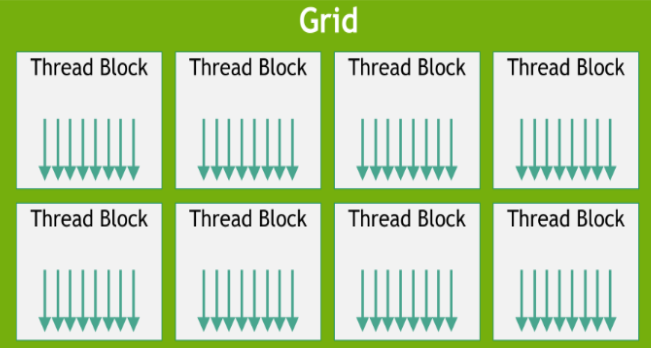
This organization lets the GPU manage thousands of threads executing in parallel. Each thread can query built-in variables (threadIdx, blockIdx, blockDim, gridDim) to determine its position in the grid, allowing it to process different data segments. Threads within a block can share data and synchronize, while blocks are independent—a design that enables massive parallelism and scalability. Each thread uses these indices to know which portion of data to process, making the mapping between thread identity and data straightforward.
#include<stdio.h>
__global__ void cuda_hello(){
    printf("Hello world from GPU\tthreadIdx(x:%u,y:%u,z:%u)\tblockIdx(x:%u,y:%u,z:%u)\tblockDim(x:%u,y:%u,z:%u)\tgridDim(x:%u,y:%u,z:%u)\n"
        ,threadIdx.x,threadIdx.y,threadIdx.z
        ,blockIdx.x,blockIdx.y,blockIdx.z
        ,blockIdx.x,blockIdx.y,blockIdx.z
        ,gridDim.x,gridDim.y,gridDim.z);
}

int main(){
    cuda_hello<<<2,2>>>();
    cudaDeviceSynchronize();
    return 0;
}
Output:
Hello world from GPU    threadIdx(x:0,y:0,z:0)  blockIdx(x:0,y:0,z:0)   blockDim(x:0,y:0,z:0)   gridDim(x:2,y:1,z:1)
Hello world from GPU    threadIdx(x:1,y:0,z:0)  blockIdx(x:0,y:0,z:0)   blockDim(x:0,y:0,z:0)   gridDim(x:2,y:1,z:1)
Hello world from GPU    threadIdx(x:0,y:0,z:0)  blockIdx(x:1,y:0,z:0)   blockDim(x:1,y:0,z:0)   gridDim(x:2,y:1,z:1)
Hello world from GPU    threadIdx(x:1,y:0,z:0)  blockIdx(x:1,y:0,z:0)   blockDim(x:1,y:0,z:0)   gridDim(x:2,y:1,z:1)
- CUDA memory hierarchy: CUDA devices have multiple memory tiers: global memory, shared memory, local memory, and registers. They trade off capacity for speed—larger capacity means higher latency; registers are fastest but fewest, shared memory is faster than global, and global memory is largest but slowest. Understand each type's scope and characteristics: global memory is accessible by all threads (device VRAM, with data copied from host via PCIe); shared memory is a high-speed cache local to each block, useful for increasing data reuse within a block and reducing global memory traffic; local memory is thread-private (register spill space); registers are exclusively per-thread and fastest but limited. Mastering these memory types and their smart use is crucial for high-performance CUDA—for example, placing repeatedly accessed data in shared memory to reduce global memory accesses.
- CUDA kernel writing and invocation: A CUDA program consists of host code running on CPU and device code running in parallel on GPU. The parallel device code is called a kernel. Mark kernels with the
__global__modifier to indicate GPU execution. Host code invokes kernels via special syntax:kernel<<<gridDim, blockDim>>>(args...);, wheregridDimandblockDimspecify the number of blocks and threads per block. The CUDA runtime deploys the specified blocks to streaming multiprocessors (SMs) on the GPU. Inside the kernel, threads use index variables to process different data elements. Synchronization primitives like__syncthreads()synchronize threads within a block at a barrier, ensuring shared memory consistency. In this stage, practice allocating GPU memory (cudaMalloc), transferring data host-to-device (cudaMemcpy), launching kernels, copying results back (cudaMemcpy), and freeing memory. These steps form the basic CUDA execution flow. Implement simple examples (vector addition, matrix addition, etc.) to become comfortable with the pattern and verify GPU acceleration gains.
Advanced Stage
This stage goes deeper into high-level CUDA features and optimization techniques to extract maximum GPU performance. Completing this stage, you'll write more efficient CUDA code and leverage asynchronous concurrency to boost throughput.
- Asynchronous concurrency and streams: By default, CUDA host code and GPU execution are synchronized, with kernels and transfers executing sequentially on the GPU. The host waits for GPU tasks to complete before continuing, and the GPU runs one kernel at a time. To better use GPU resources and hide data transfer latency, CUDA provides streams—instruction queues where the GPU can execute operations from multiple streams concurrently. The default stream (stream 0) is implicit and synchronous; explicit streams allow asynchronous parallel execution. For example, run a kernel on one stream while simultaneously transferring the next batch of data on another, overlapping computation and communication. This async concurrency significantly improves throughput. Note that streams are independent by default; use events to synchronize between them. Events record completion in one stream and allow another stream to wait on it, or measure elapsed time. After mastering streams and events, explore advanced techniques like
cudaMemcpyAsyncfor asynchronous transfers and stream priority settings to increase concurrency. - Performance optimization techniques: GPU optimization is central to advanced CUDA. After writing correct code, focus on memory access patterns and thread scheduling efficiency. Start with memory coalescing: when all threads in a warp (typically 32 parallel threads) access consecutive global memory addresses, the hardware merges these accesses into as few transactions as possible, efficiently using memory bandwidth. Aligned, contiguous accesses complete in one request per warp; scattered accesses split into multiple transactions, reducing efficiency. Design data structures and access patterns so neighboring threads access neighboring data. For example, when processing 2D arrays, assign rows to threads so sequential thread IDs access sequential memory. Next, understand shared memory bank conflicts: shared memory splits into banks for parallel access. If multiple threads in a warp access different addresses in the same bank simultaneously, a conflict occurs, serializing those accesses across multiple batches and reducing throughput. Avoid conflicts by understanding data layout in shared memory, or padding array elements to spread addresses across banks when access patterns are unfavorable. Beyond memory, CUDA optimization includes reducing warp divergence (keeping threads in a warp on the same code path), raising the compute-to-memory ratio (more computation per memory access), and tuning block size for occupancy (hardware utilization). This stage can include NVIDIA profiling tools (Nsight Compute/Systems,
nvprof) to identify bottlenecks and guide optimization.
Deep Learning Stage
With foundational and advanced CUDA knowledge, the final stage applies GPU acceleration to deep learning, using specialized techniques and libraries. Deep learning training and inference rely on linear algebra at scale, and CUDA provides optimized tools.
- Matrix multiplication on GPU and basic operators: Matrix multiplication (GEMM) is ubiquitous in deep learning and scientific computing and is core to neural network layers (fully connected, convolution after unrolling). GPUs excel at parallelizable dense compute, making large matrix multiplication on GPU a natural acceleration target and ideal for understanding CUDA parallelism. Try writing a CUDA kernel for matrix multiplication, optimizing thread block layout and using shared memory for tiling to improve performance, then compare against CPU or library implementations. Beyond matrix multiply, basic operators like vector dot product, matrix transpose, and matrix reduction (sum, max) appear frequently in deep learning and benefit from CUDA parallelization. For example, implement large vector dot products by having each thread handle a portion of the multiply-add, then use parallel reduction for the result.
- Convolution and CUDA implementation: Convolution is central to deep learning, especially CNNs. Direct 2D convolution involves nested loops with huge computational cost—ideal for GPU acceleration. CUDA accelerates convolution in several ways: convert it to matrix multiply via im2col+GEMM, or write a conv kernel where each thread computes one output pixel (using shared memory to cache filter weights and input tiles). Understanding GPU convolution implementation reveals how deep learning frameworks accelerate. Writing efficient convolution from scratch is challenging; NVIDIA provides professional libraries instead.
- CUDA deep learning libraries (cuBLAS and cuDNN): NVIDIA provides mature libraries for deep learning acceleration. cuBLAS is CUDA's basic linear algebra library, implementing GPU BLAS functions (matrix multiply, vector operations, etc.). Using cuBLAS, you call highly optimized matrix functions without hand-writing kernels. Note that cuBLAS uses column-major storage (Fortran/BLAS convention), differing from C's row-major order—pay attention to matrix transpose or layout parameters when calling. cuDNN (CUDA Deep Neural Network library) provides efficient GPU implementations of convolution, pooling, activation, RNN, and other deep learning operators. Researchers and framework developers rely heavily on cuDNN for GPU performance while avoiding low-level optimization. In mainstream frameworks, most forward-backward tensor operations call cuDNN and cuBLAS, letting developers focus on models while delegating performance to libraries. Learn to call these libraries—try cuBLAS for matrix multiply or cuDNN for CNN forward pass and compare performance against hand-written kernels. Feel the optimization level professional libraries achieve.
- TensorRT: After training, deployment requires extracting inference performance. TensorRT is NVIDIA's deep learning inference optimization framework. It accepts trained networks (via ONNX or other formats) and optimizes them (FP16/INT8 precision reduction, operator fusion, automatic fastest kernel selection, memory reuse, async execution). TensorRT uses CUDA's advanced features (streams, multi-core parallelism, tensor core instructions) to generate highly optimized inference engines for specific GPUs. Learning CUDA helps you understand TensorRT's acceleration strategies: memory coalescing, operator fusion, multi-stream execution—all technical foundations for inference speedup. While using TensorRT requires no hand-written CUDA, understanding its principles deepens your grasp of GPU acceleration for deep learning. For latency-sensitive projects, TensorRT mastery significantly cuts latency and raises throughput.
Practice
Theory combined with practice best embeds CUDA mastery. Below are recommended practice projects and cases to reinforce learning and build hands-on experience:
- CUDA sample programs: Start with official samples or tutorials, running and analyzing simple CUDA programs. For example, the classic "vectorAdd" and "matrixMul" examples in NVIDIA CUDA Samples. Through these entry-level cases, master the basic CUDA program structure: memory allocation, data transfer, kernel launch, result verification. Modify block size and observe effects on results and performance.
- Matrix multiply optimization comparison: Implement a hand-written CUDA kernel for matrix multiplication on large matrices, time it, and analyze performance. Then call cuBLAS matrix multiply (e.g.,
cublasSgemm) for the same computation and compare results and performance. Through contrast, feel the impact of manual optimization (shared memory tiling, loop unrolling, reduced global memory traffic) and how library functions exploit GPU bandwidth and compute. This exercise teaches GPU matrix optimization essentials—the foundation of deep learning acceleration. - CUDA optimization project: Pick a compute-intensive machine learning algorithm and accelerate it with CUDA. Examples:
- Implement large vector dot product or matrix reduction (vector norm, sum of all elements) and optimize parallel performance, comparing against CPU single-thread baseline.
- Write a CUDA kernel for simplified CNN forward pass: a small convolution layer plus ReLU mapping input images to output features. Start with direct convolution, then optimize (shared memory tile caching or im2col+matrix multiply) and compare performance gains.
- Rewrite existing machine learning Python code (NumPy implementations) as CUDA C/C++, or wrap CUDA via Python C extensions, for dramatic speedup. Examples: CUDA-accelerated distance computation in K-Means, or batch gradient computation in logistic regression.
- Deep learning framework custom operators: For developers who've mastered CUDA basics, try writing custom GPU operators for deep learning frameworks. For example, implement a new operator in PyTorch with CUDA (custom activation forward/backward, NMS, etc.). This combines framework interfaces with CUDA tensor operations. You gain both framework–CUDA familiarity and practical optimization skills.
- Reading open-source GPU code: Study excellent open-source projects and libraries with CUDA components to learn advanced techniques. NVIDIA's open-source CUTLASS library builds high-performance matrix multiply kernels using templates with tensor core utilization and register tiling. Classic deep learning frameworks (Caffe, Darknet) include layer implementations in CUDA—reading this code teaches real-world CUDA organization. Analyzing others' code reinforces concepts and shares practical patterns.
Through these exercises, you progressively transform theory into skill. Problems you encounter (memory overruns, inconsistent results across GPUs) are valuable learning chances—they force you to understand CUDA internals. Repeated debugging and optimization substantially improve CUDA proficiency.
Learning Resources
Official documentation and tutorials: Start with NVIDIA's official documentation and tutorials, including the CUDA C Programming Guide and CUDA Best Practices Guide. These authoritative resources detail CUDA's programming model and features with optimization guidance. NVIDIA's developer portal CUDA Zone provides rich entry resources (videos, sample code, webinars) plus programming guides and API reference. Reading official docs gives comprehensive, systematic understanding of CUDA architecture and interfaces.
Online courses: Structured online courses teach CUDA parallel programming systematically. Examples include Udacity's CUDA Parallel Programming course (teaches GPU parallel basics, free materials), Coursera's Heterogeneous Parallel Programming (CUDA C/C++ programming and optimization, expert instructors), and NVIDIA's Deep Learning Institute (DLI) training courses. These typically include video lectures, sample code, and assignments, progressively building skills from basics to advanced.
Books: Classic references include CUDA By Example and Programming Massively Parallel Processors. These cover CUDA from theory to practice in detail, with fundamentals, examples, and optimization techniques—excellent for deep learning reference. For algorithm and application-focused readers, books on CUDA optimization and parallel algorithms are also worthwhile.
Technical blogs and communities: Leverage community resources for others' experience and latest news. NVIDIA's official blog frequently posts CUDA optimization tips and case studies (including technical articles in Chinese). Developer forums welcome questions and discussion. In Chinese communities, CSDN and Zhihu host extensive CUDA tutorials and lessons learned—search keywords like "CUDA memory optimization" or "shared memory bank conflict examples". Stack Overflow and English forums similarly aggregate solutions. Active participation helps solve real problems and broadens perspective.
Open-source code and projects: Search "CUDA" on GitHub to find many open-source projects and code snippets—machine learning acceleration libraries, GPU algorithm implementations, etc. Reference these for practical CUDA usage. The kokkos project shows cross-platform parallel implementation; the CUDA Samples repository collects classic examples. Reading and running this code deepens understanding of CUDA APIs and optimization approaches.