What Is an Agent, Really? The Essence of a While Loop
Full source code: github.com/geyuxu/yuxu-java-agent
If you search "AI Agent" on social media, you'll find endless flashy definitions: autonomous intelligent entities, embodied cognitive systems, goal-driven decision engines...
Forget all of that.
Today we'll start from the simplest possible angle and reveal the entire secret of an Agent with a single piece of Java code.
One-Line Definition
Agent = while loop + tool calling
That's it.
An LLM by itself can only generate text. It can't read files, run tests, or inspect errors. Without a loop, every tool invocation requires you to manually paste results back in — you become the loop.
What an Agent does is free you from being that loop.
Minimal Agent Architecture
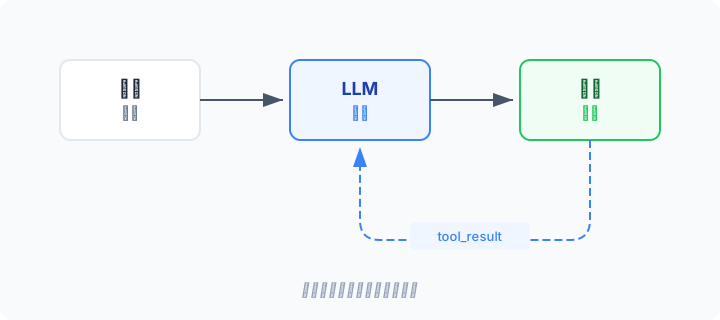
The entire control flow has one exit condition: the model's finish_reason is no longer "tool_calls".
This means:
- The model decides which tool to call (reasoning)
- The system executes the tool and returns results (execution)
- The model decides what to do next based on the results (more reasoning)
- Until the model considers the task complete and outputs a final answer (termination)
Building a Complete Agent in Java
Let's build a fully runnable Agent from scratch in Java. No framework magic, no Spring — just raw HTTP calls so you can see every detail.
We use OpenAI's Chat Completions API with its function calling mechanism to let the model invoke tools.
Step 1: Dependencies
Two standard Java libraries: OkHttp for HTTP requests, Gson for JSON serialization.
Maven dependencies:
<dependencies>
    <dependency>
        <groupId>com.squareup.okhttp3</groupId>
        <artifactId>okhttp</artifactId>
        <version>4.12.0</version>
    </dependency>
    <dependency>
        <groupId>com.google.code.gson</groupId>
        <artifactId>gson</artifactId>
        <version>2.10.1</version>
    </dependency>
</dependencies>
Step 2: Define the Tool
An Agent needs "hands and feet." We give it just one tool — executing bash commands. One tool is enough because bash can do almost anything.
Here's the OpenAI function calling format:
static final List<Map<String, Object>> TOOLS = List.of(
        Map.of(
                "type", "function",
                "function", Map.of(
                        "name", "bash",
                        "description", "Execute a bash shell command and return the output.",
                        "parameters", Map.of(
                                "type", "object",
                                "properties", Map.of(
                                        "command", Map.of(
                                                "type", "string",
                                                "description", "The bash command to execute"
                                        )
                                ),
                                "required", List.of("command")
                        )
                )
        )
);
The tool execution function is equally simple — use ProcessBuilder to run a shell command and capture the output:
static String executeBash(String command) {
    try {
        Process process = new ProcessBuilder("sh", "-c", command)
                .redirectErrorStream(true)  // merge stdout and stderr
                .start();

        String output = new String(process.getInputStream().readAllBytes());
        boolean finished = process.waitFor(120, TimeUnit.SECONDS);

        if (!finished) {
            process.destroyForcibly();
            return "Error: Timeout (120s)";
        }
        return output.isBlank() ? "(no output)" : output.trim();
    } catch (Exception e) {
        return "Error: " + e.getMessage();
    }
}
Step 3: The Core — Agent Loop
This is the most important part of the entire article. The essence of every Agent lives in this single method:
static void agentLoop(List<Map<String, Object>> messages, ModelClient modelClient)
        throws IOException {

    while (true) {

        // 1. Call the model: send the full message history to the LLM
        Map<String, Object> choice = modelClient.call(messages);

        String finishReason = (String) choice.get("finish_reason");
        Map<String, Object> assistantMsg =
                (Map<String, Object>) choice.get("message");

        // 2. Append the model's reply to message history
        messages.add(assistantMsg);

        // 3. Check exit condition: model no longer calling tools → task complete
        if (!"tool_calls".equals(finishReason)) {
            String content = (String) assistantMsg.get("content");
            if (content != null) {
                System.out.println("\nAssistant: " + content);
            }
            return;
        }

        // 4. Execute each tool call, collect results
        List<Map<String, Object>> toolCalls =
                (List<Map<String, Object>>) assistantMsg.get("tool_calls");

        for (Map<String, Object> toolCall : toolCalls) {
            String callId = (String) toolCall.get("id");
            Map<String, Object> function =
                    (Map<String, Object>) toolCall.get("function");
            String arguments = (String) function.get("arguments");

            Map<String, String> args = gson.fromJson(arguments, Map.class);
            String command = args.get("command");

            System.out.println("\n> bash: " + command);
            String output = executeBash(command);
            System.out.println(output);

            // 5. Append tool results to message history (OpenAI format: role=tool)
            messages.add(Map.of(
                    "role", "tool",
                    "tool_call_id", callId,
                    "content", output
            ));
        }

        // Back to step 1
    }
}
That's all there is to it. This is a complete Agent.
Breaking Down the Loop
Let's slow down and look at what each step actually does:
| Step | What | Why |
|---|---|---|
| Call model | Send full message history to LLM | The model needs all context to make correct decisions |
| Append reply | Add assistant message to history | Maintain conversation coherence — the model needs to see its own previous output |
| Check exit | finish_reason is not tool_calls |
Model decides no more tools needed = task complete |
| Execute tool | Run bash command | Turn the model's "thought" into "action" |
| Append result | Add tool message to history |
The model needs execution results to reason about the next step |
There's an elegant subtlety in this loop: the model decides when to stop. You don't need any conditional logic, no state machine, no flowchart. If the model says "I need to call another tool," the loop continues; if it says "I'm done," the loop exits.
Step 4: HTTP Call
For completeness, here's the method that calls the OpenAI Chat Completions API. This is pure glue code, not the focus:
private static final String API_URL = "https://api.openai.com/v1/chat/completions";
private static final String MODEL = "gpt-4o-mini";
private static final OkHttpClient httpClient = new OkHttpClient.Builder()
        .readTimeout(60, TimeUnit.SECONDS).build();
private static final Gson gson = new Gson();

static ModelClient createOpenAIClient(String apiKey) {
    return messages -> {
        Map<String, Object> body = new LinkedHashMap<>();
        body.put("model", MODEL);
        body.put("messages", messages);
        body.put("tools", TOOLS);

        Request request = new Request.Builder()
                .url(API_URL)
                .addHeader("Authorization", "Bearer " + apiKey)
                .addHeader("Content-Type", "application/json")
                .post(RequestBody.create(
                        gson.toJson(body),
                        MediaType.get("application/json")))
                .build();

        try (Response response = httpClient.newCall(request).execute()) {
            if (!response.isSuccessful()) {
                throw new IOException("API error " + response.code()
                        + ": " + response.body().string());
            }
            Map<String, Object> responseBody = gson.fromJson(
                    response.body().string(), Map.class);
            List<Map<String, Object>> choices =
                    (List<Map<String, Object>>) responseBody.get("choices");
            return choices.get(0);
        }
    };
}
Step 5: Entry Point
public static void main(String[] args) throws IOException {
    String apiKey = System.getenv("OPENAI_API_KEY");
    if (apiKey == null) {
        System.err.println("Please set OPENAI_API_KEY");
        return;
    }

    ModelClient client = createOpenAIClient(apiKey);

    String userInput = args.length > 0 ? args[0] : "List current directory files";
    System.out.println("User: " + userInput);

    List<Map<String, Object>> messages = new ArrayList<>();
    messages.add(Map.of("role", "system", "content", SYSTEM_PROMPT));
    messages.add(Map.of("role", "user", "content", userInput));

    agentLoop(messages, client);
}
The Messages Array: An Agent's Short-Term Memory
Notice that the most important data structure in our Agent isn't the model or the tools — it's the messages list that threads through the entire process.
messages = [
    { role: "system",    content: "You are a coding agent..." }        // system prompt
    { role: "user",      content: "Create a hello.py for me" }         // user input
    { role: "assistant", tool_calls: [bash("touch hello.py")] }        // model calls bash
    { role: "tool",      content: "(no output)" }                      // bash result
    { role: "assistant", tool_calls: [bash("cat hello.py")] }          // model calls again
    { role: "tool",      content: "print('hello')" }                   // second result
    { role: "assistant", content: "hello.py has been created..." }     // final answer
]
Each loop iteration appends to this list: the model's reply, the tool's result, back and forth. The model sees the complete history, enabling coherent multi-step reasoning.
Here's a question worth thinking about: messages only ever grow, eventually filling the context window. After 50 tool calls, your messages array might contain hundreds of thousands of tokens. What then? We'll tackle this problem in a later post.
Try It Yourself
# Clone the project
git clone https://github.com/geyuxu/yuxu-java-agent.git
cd yuxu-java-agent

# Set your API key
export OPENAI_API_KEY="your-key-here"

# Compile and run
mvn compile exec:java -Dexec.args="'List all Java files in the current directory'"
Try these prompts and watch how the Agent calls bash step by step, gets results, and decides what to do next:
"List all Java files in the current directory""Create a test_output directory and write 3 files in it""Check system memory usage and find the top 5 processes"
What Production Agents Add
We wrote fewer than 100 lines of core logic. A production Agent might have thousands. What are those extra lines doing?
                    +-- Streaming (show tokens as they arrive)
                    +-- Permission checks (confirm before dangerous commands)
                    +-- Error recovery (retry on API timeouts/rate limits)
 while (true) ------+-- Context compression (summarize when tokens exceed limit)
                    +-- Abort handling (user can Ctrl+C at any time)
                    +-- Max turn limits (prevent infinite loops)
                    +-- Parallel tool execution (run independent calls concurrently)
Each of these is a real-world requirement pressuring that simple while loop. But no matter how much the code grows, the core never changes:
Call model -> Check if tools needed -> Execute tools -> Feed results back -> Repeat
You may have noticed a seemingly minor but profoundly important design choice in our Agent loop: the model decides when to stop.
This isn't engineering laziness. It's the fundamental difference between an Agent and a traditional automation script.
A shell script has you write every step: do A, then B, then C. The steps are fixed; hit something unexpected and it breaks.
In an Agent's loop, you only define "what it can do" (tools), not "what it should do" (workflow). At each iteration, the model examines the full context — the user's original request, results from all previous tool calls, any errors encountered — and autonomously decides the next step. It might call 3 tools, or 30. It might encounter an error and retry with a different approach, or discover the task is simpler than expected and finish early.
This is why a while loop plus tool calling constitutes an Agent. The loop provides the ability to keep acting, tools provide the ability to affect the outside world, and the model provides the ability to make judgments at every decision point.
All three are indispensable.
Summary
The essence of an Agent is a while loop. The model thinks, the tools act, and the loop ties them together.
Full source code: github.com/geyuxu/yuxu-java-agent