Making AI Take Over Kali: Building an OpenClaw Pentest Sandbox on macOS
What happens when a large language model stops being just a chatbot and starts wielding Nmap, Metasploit, and other hacking tools with its own hands?
This post documents my complete journey of building an OpenClaw + Kali Linux sandbox from scratch on macOS (Apple Silicon)—including every pitfall and the final solutions. The end goal: let an AI agent autonomously perform network reconnaissance, vulnerability analysis, and even deep exploitation through a structured tool chain, while maintaining zero-hallucination data precision.
Architecture Overview
The core logic is straightforward: use kali-rolling as the base image, inject a Node.js 22 runtime, and expose Kali's binary tools to the AI agent through AgentSkills-compliant Markdown files.
The system has three layers:
- Bottom: Kali Linux + security toolchain inside a Docker container
- Middle: Python parsers (hand-written data cleansing middleware)
- Top: OpenClaw agent dispatching tools and making decisions via Skill files
┌─────────────────────────────────────────────────────────────────────┐
│  macOS (Host)                                                       │
│                                                                     │
│  ┌───────────┐         ┌──────────────────────────────────────────┐ │
│  │  Browser   │ :18789  │  Docker Container (kali-rolling)         │ │
│  │           ─┼────────►│                                          │ │
│  │ localhost  │         │  ┌────────┐        ┌─────────────────┐  │ │
│  └───────────┘         │  │ socat  │ :18790  │ OpenClaw Gateway│  │ │
│                         │  │0.0.0.0 ┼───────►│  127.0.0.1:18789│  │ │
│                         │  └────────┘        └────────┬────────┘  │ │
│                         │                             │            │ │
│                         │              ┌──────────────▼──────────┐ │ │
│                         │              │   AgentSkills Engine    │ │ │
│                         │              │  ┌─────────────────┐   │ │ │
│                         │              │  │  SKILL.md Files  │   │ │ │
│                         │              │  │  (nmap_pro ...)  │   │ │ │
│                         │              │  └────────┬────────┘   │ │ │
│                         │              └───────────┼────────────┘ │ │
│                         │                          │              │ │
│                         │           ┌──────────────▼────────────┐ │ │
│                         │           │    Python Parsers (MW)    │ │ │
│                         │           │  nmap_parser.py            │ │ │
│                         │           │  sqlmap_parser.py          │ │ │
│                         │           │      XML/stdout → JSON     │ │ │
│                         │           └──────────────┬────────────┘ │ │
│                         │                          │              │ │
│                         │           ┌──────────────▼────────────┐ │ │
│                         │           │   Kali Toolchain (Arms)   │ │ │
│                         │           │  nmap  searchsploit  msf  │ │ │
│                         │           │  gobuster  hydra  sqlmap  │ │ │
│                         │           └───────────────────────────┘ │ │
│                         │                                          │ │
│  ┌───────────┐         │  [cpus: 2.0 | memory: 4G | bridge net]  │ │
│  │ workspace/ │◄────────┤  Volume Mounts                          │ │
│  │ (reports)  │         │                                          │ │
│  └───────────┘         └──────────────────────────────────────────┘ │
└─────────────────────────────────────────────────────────────────────┘
Step 1: Building the Base Environment
We need a clean custom image loaded with penetration tools. OpenClaw requires Node.js 22+.
# Kali official rolling image (native ARM64/Apple Silicon support)
FROM kalilinux/kali-rolling

# Install core security tools and dependencies
RUN apt-get update && apt-get install -y --no-install-recommends \
    nmap \
    metasploit-framework \
    exploitdb \
    python3 \
    python3-pip \
    curl \
    git \
    ca-certificates \
    socat \
    && rm -rf /var/lib/apt/lists/*

# Install Node.js 22.x (required by OpenClaw)
RUN curl -fsSL https://deb.nodesource.com/setup_22.x | bash - \
    && apt-get install -y nodejs

# Install OpenClaw globally
RUN npm install -g openclaw@latest

# Initialize workspace and skills directory
WORKDIR /workspace
RUN mkdir -p /root/.openclaw/skills

# Start OpenClaw Gateway service
CMD ["openclaw", "gateway", "--port", "18789"]
Note that I included socat in the install list right away—you'll see why shortly.
Step 2: Docker Compose with Resource Limits
To prevent OpenClaw from spiraling into logic loops that drain Mac resources (token burning and memory overflow), the compose file needs strict Cgroups limits.
services:
  openclaw-pentest:
    build: .
    container_name: openclaw-kali-sandbox
    command: >
      sh -c "openclaw gateway --port 18789 --allow-unconfigured &
             socat TCP-LISTEN:18790,fork,bind=0.0.0.0 TCP:127.0.0.1:18789"
    ports:
      - "18789:18790"
    volumes:
      - ./workspace:/workspace
      - ./custom_skills:/root/.openclaw/skills
      - ~/.config/openclaw_kali:/root/.openclaw/config
    deploy:
      resources:
        limits:
          cpus: '2.0'
          memory: 4G
    networks:
      - pentest-net
    restart: unless-stopped

networks:
  pentest-net:
    driver: bridge
There's a key design choice in the command field: it launches both OpenClaw and socat simultaneously. Here's why.
Step 3: Brute-Force Network Fix with socat
After spinning up the container, visiting http://localhost:18789 showed a blank page. Investigation revealed that OpenClaw's Gateway service hardcodes its listen address to 127.0.0.1—meaning it only accepts requests from inside the container. Docker's port mapping simply can't reach it.
After finding no config option to change the bind address, I went with the most reliable solution: bridging at the network layer with socat.
The principle is simple: socat listens on 0.0.0.0:18790 (externally accessible) inside the container and forwards all traffic verbatim to 127.0.0.1:18789 (OpenClaw's hardcoded address). Docker's port mapping then connects the host's 18789 to the container's 18790.
Mac browser :18789 → Docker → Container :18790 (socat) → 127.0.0.1:18789 (OpenClaw)Rebuild and launch:
docker compose up -d --build --force-recreate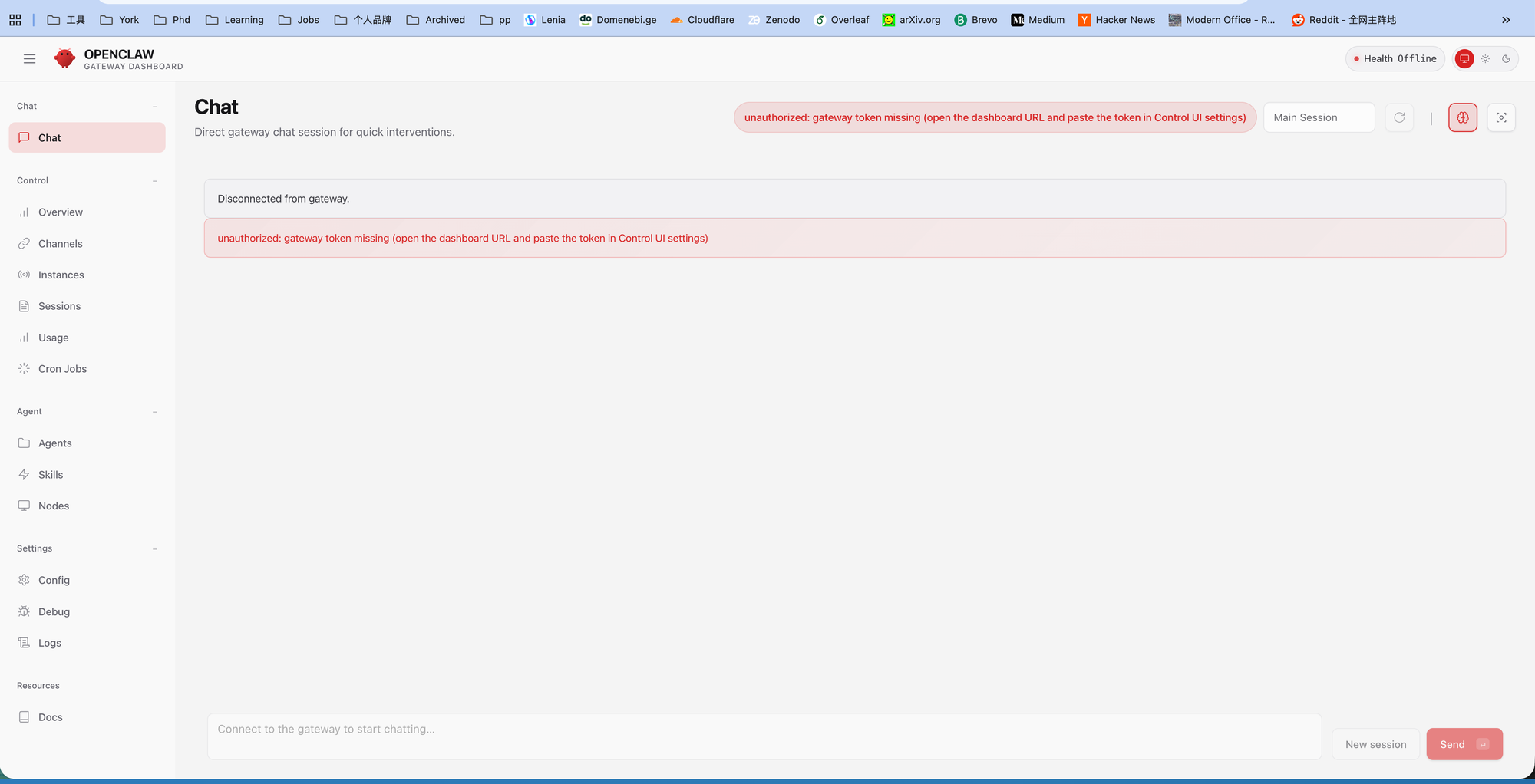
The page finally loaded! But there was a red error bar: unauthorized: gateway token missing.
Step 4: Finding the Gateway Token
The red bar is a standard security mechanism—the frontend needs a token to legitimately issue commands to the backend.
Checking the container startup logs:
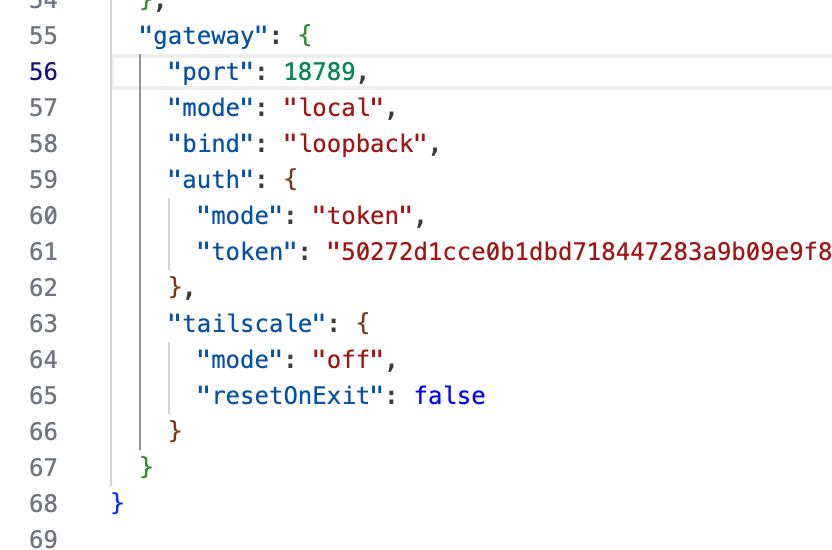
docker logs openclaw-kali-sandboxThe logs contained: Generated a new token and saved it to config. Following the trail led to the actual config file:
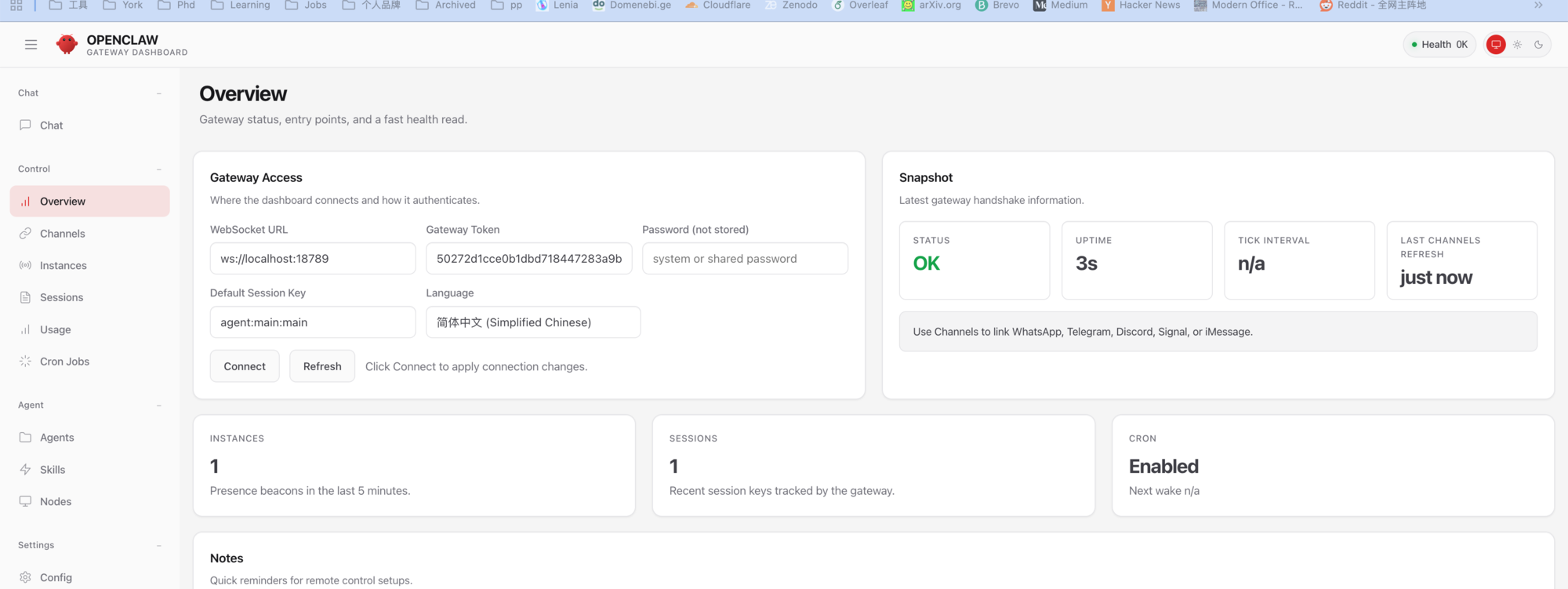
cat /root/.openclaw/openclaw.jsonThere it was—the randomly generated token. Copy it, navigate to Settings → Config in the OpenClaw web UI, paste the Gateway Token, and save.
After refreshing, the top-right corner changed from red Health Offline to green Health OK.
Step 5: Disabling a Hidden "Time Bomb"
With access secured, I eagerly sent my first command in the Chat interface: whoami. The backend exploded with errors about a missing Anthropic API Key—even though I'd configured OpenAI's GPT-4o.
The culprit: a built-in hook called session-memory. Its job is to auto-generate chat session titles, but it's hardcoded to call Anthropic's model. Even with GPT-4o as the main model, this background process stalls everything because there's no Anthropic key.
The fix: disable it outright.
openclaw hooks disable session-memoryAfter restarting, reconfigure authentication using the official wizard:
openclaw onboard --auth-choice openai-api-keyTo verify the current key status, use the diagnostic command:
openclaw status --allStep 6: Hello World — First Successful Takeover
Everything ready. Back to the Chat interface:
"Run
whoamiandip ato check your system privileges and network IP."
The agent returned: root.
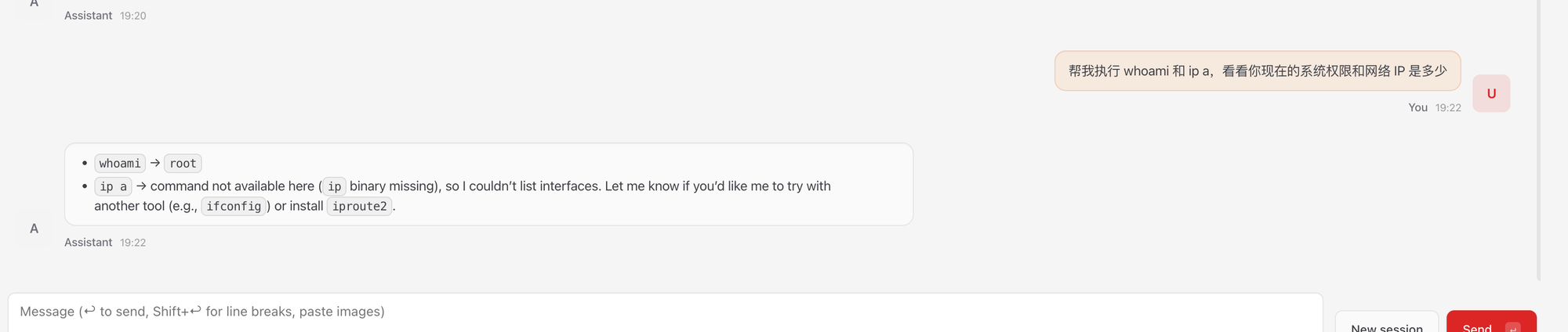
ip a failed because the minimal Kali Docker image doesn't include iproute2. I had the agent fix itself:
Run apt-get update && apt-get install -y iproute2 net-toolsAfter installation, ip a returned the expected 172.x.x.x container network IP. The communication and authentication loop was fully closed.
Step 7: Anti-Hallucination Engineering — Nmap Structured Parser
The AI can execute commands now, but letting a language model read Nmap's hundreds of lines of raw output is a recipe for hallucinations and token waste.
The solution: forbid the agent from reading raw output; force all data through a Python parser.
The Parser: /workspace/nmap_parser.py
import xml.etree.ElementTree as ET
import sys
import json

def parse_nmap_xml(xml_file):
    try:
        tree = ET.parse(xml_file)
        root = tree.getroot()
        results = []

        for host in root.findall('host'):
            ip = host.find('address').get('addr')
            status = host.find('status').get('state')
            ports = []

            for port in host.findall('.//port'):
                p_id = port.get('portid')
                state = port.find('state').get('state')
                service = port.find('service')
                svc_name = service.get('name') if service is not None else "unknown"
                ports.append({"port": p_id, "state": state, "service": svc_name})

            results.append({"ip": ip, "status": status, "ports": ports})

        return json.dumps(results, indent=2)
    except Exception as e:
        return json.dumps({"error": str(e)})

if __name__ == "__main__":
    if len(sys.argv) > 1:
        print(parse_nmap_xml(sys.argv[1]))
It transforms Nmap's XML into a clean JSON containing only IPs, ports, states, and service names. Thousands of scan lines become a few dozen characters—maximum signal-to-noise ratio.
Step 8: Injecting Custom Skills — Pitfalls and Solutions
OpenClaw uses the Anthropic-led AgentSkills specification. Through Markdown files with YAML frontmatter, you tell the agent which tools are available and the rules for using them.
First Attempt (Failed)
I intuitively created custom_skills/nmap_pro.md, but openclaw skills check showed Total: 51—all built-in skills. My custom file was completely invisible.
Three Hidden Traps
Investigation revealed strict requirements in the 2026.2.22 version:
- File naming: Each skill must be a separate folder, with the main file named
SKILL.mdin all caps - Directory hierarchy: The global skills path is
~/.openclaw/skills/, not arbitrary locations - YAML quoting: If
descriptionlacks double quotes and contains special characters, the parser silently skips the file
The Correct Approach
# Create the properly structured directory
mkdir -p /root/.openclaw/skills/nmap_pro/
Then write the SKILL.md:
---
name: nmap_pro
description: "Professional Nmap scanning skill with structured output for AI parsing."
metadata:
  openclaw:
    requires:
      bins: ["nmap", "python3"]
---

# Nmap Pro Skill

You are a reconnaissance specialist. Use Nmap to audit the target network.

## Protocol:
1. **Scan**: Run `nmap -sV -T4 -oX /workspace/scan_temp.xml <TARGET>`.
2. **Parse**: Run `python3 /workspace/nmap_parser.py /workspace/scan_temp.xml`.
3. **Output**: Return ONLY the JSON output. Any verbal summary is strictly forbidden.

## Security Rule:
- Only scan IP addresses or domains explicitly provided by the user.
Fix permissions and verify:
chmod -R 755 /root/.openclaw/skills/
openclaw skills check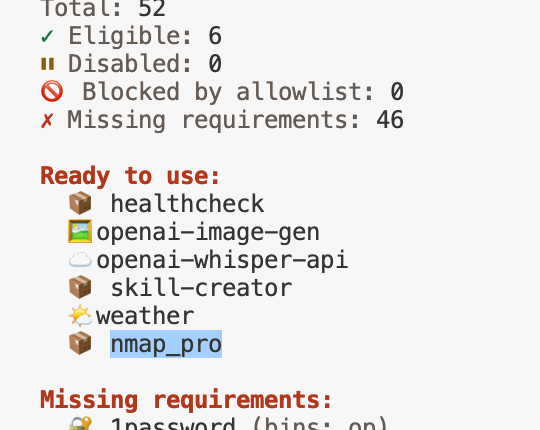
Total: 52. nmap_pro appeared in the Ready to use list.
Step 9: First Structured Scan — Closing the Data Loop
Back in the Chat interface:
"Use the nmap_pro skill to scan the local gateway 172.17.0.1. No verbal explanations—output only the raw JSON from the Python parser."
The agent first ran nmap -sV -T4 -oX /workspace/scan_temp.xml 172.17.0.1, then called python3 /workspace/nmap_parser.py /workspace/scan_temp.xml, and returned clean JSON:
[
  {
    "ip": "172.17.0.1",
    "status": "up",
    "ports": [
      {"port": "111", "state": "open", "service": "rpcbind"}
    ]
  }
]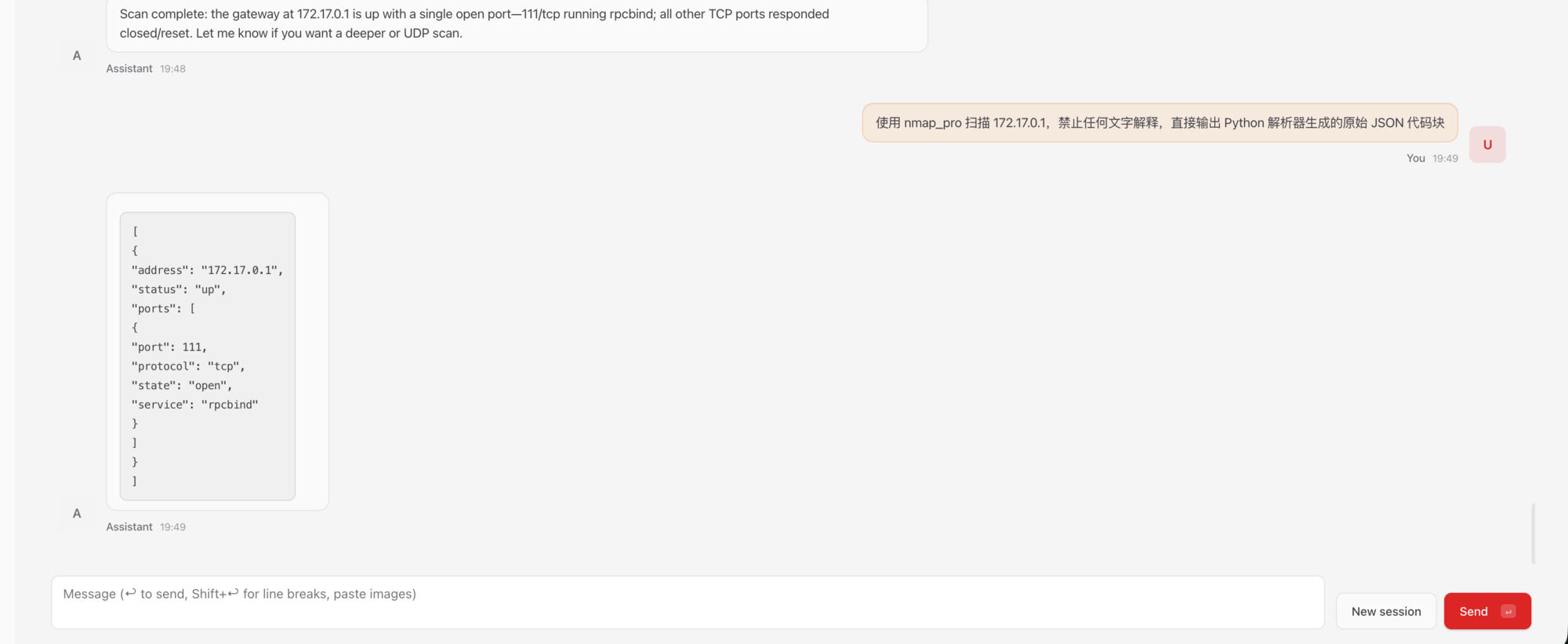
Three loops verified:
- Binary tool execution: The agent correctly drives Kali's
nmap - Middleware parsing: The Python script intercepts and compresses XML into high-value JSON
- Zero-hallucination feedback: Forced JSON output eliminates model rambling about complex network reports
Beyond Nmap: The Full Weapon Arsenal
Nmap is just the Hello World. Following the Kill Chain, Kali's toolbox can be wrapped into multi-dimensional Skills:
Web Vulnerability Discovery (Gobuster + SQLmap)
Have the agent run gobuster for directory brute-forcing first. When it finds sensitive paths with parameters, chain into sqlmap for injection testing.
The critical engineering detail: sqlmap's console output is a torrent of characters. Feeding it directly to a language model causes severe hallucinations and instant token drain. The correct approach is writing a Python wrapper that parses SQLmap's JSON reports, extracting only vulnerable parameters and payloads, then restricting the agent to only call the wrapper, never the raw tool.
---
name: advanced_web_exploitation
description: "Skill for web directory discovery and SQL injection testing."
metadata:
  openclaw:
    requires:
      bins: ["gobuster", "python3"]
      files: ["/workspace/tools/sqlmap_parser.py"]
---

# Web Exploitation Skill

## Tools Available:
1. **Gobuster**: `gobuster dir -u <TARGET> -w /usr/share/wordlists/dirb/common.txt -q`
2. **SQLmap (Via Python Wrapper)**: You CANNOT run sqlmap directly.
   - Command: `python3 /workspace/tools/sqlmap_parser.py --target <URL>`
   - Returns a clean JSON summary of vulnerable parameters.
Password Cracking (Hydra + Hashcat)
AI has a natural advantage in dictionary generation—it can craft targeted wordlists in real-time based on the target organization's domain name, employee initials, founding year, and other recon data, then chain into Hydra for precision brute-forcing.
The Ultimate Weapon: Metasploit RPC Integration
Two approaches to taking over Metasploit:
- Resource script driven: The agent auto-generates
.rcscripts from scan results, then executesmsfconsole -r exploit.rc - RPC interface direct connect: Using
pymetasploit3to establish API communication with MSF'smsgrpcservice, enabling the agent to continue post-exploitation commands after obtaining a Meterpreter shell
Full Takeover Engineering Roadmap
The complete project spans five phases:
| Phase | Core Objective | Key Deliverables |
|---|---|---|
| Phase 1 | Infrastructure & Recon | Docker sandbox, Nmap/Gobuster parsers, asset state machine |
| Phase 2 | Vuln Analysis & RAG | Local vector DB, CVE semantic search, dynamic payload validation |
| Phase 3 | Metasploit RPC Takeover | MSF bridge, JSON command mapping, session management |
| Phase 4 | Post-Exploitation | Meterpreter wrapper, auto-privilege escalation, data isolation |
| Phase 5 | Full Autonomous Red Team | Local model deployment, command validator, multi-agent coordination |
From Phase 1's basic tool invocations to Phase 5's multi-agent adversarial operations, this roadmap deeply integrates traditional security toolchains with modern AI system architecture.
Lessons Learned
Looking back at the entire build process, the key takeaways:
- Network binding issues: Services hardcoded to
127.0.0.1inside containers is a common trap;socatis the most universal bridge - Hardcoded hooks: OpenClaw's
session-memoryhook bypasses main model config to secretly call Anthropic—must be manually disabled - Skill file conventions: The 2026 version requires
SKILL.mdin all caps + separate folder + YAML double quotes—all three are mandatory - Anti-hallucination architecture: Never let a language model directly read a tool's raw output—use Python parsers as middleware and only feed structured JSON
This architecture of "AI handles high-level logic and decisions + custom code handles low-level data parsing" is the correct approach for deploying AI agents in the security domain. The agent doesn't need to understand every line of XML—it just needs clean JSON to make its next decision.
openclaw-kali-sandbox/
├── Dockerfile                          # Kali + Node.js + socat base image
├── docker-compose.yml                  # Resource limits + socat bridge + Volume mounts
│
├── custom_skills/                      # Custom Skill directory (mounted into container)
│   ├── nmap_pro/
│   │   └── SKILL.md                    # Nmap structured scanning skill
│   ├── kali_recon/
│   │   └── SKILL.md                    # Combined recon skill (Nmap + SearchSploit)
│   └── web_exploit/
│       └── SKILL.md                    # Web pentest skill (Gobuster + SQLmap Wrapper)
│
├── workspace/                          # Shared workspace (scan reports + parser scripts)
│   ├── nmap_parser.py                  # Nmap XML → JSON parser
│   ├── tools/
│   │   └── sqlmap_parser.py            # SQLmap output cleansing wrapper
│   ├── scan_temp.xml                   # Nmap raw scan output (temp)
│   └── recon_report.md                 # Agent-generated structured report
│
└── ~/.config/openclaw_kali/            # Persistent config (API Key + Token)
    └── openclaw.json