Bringing Comments to Life: Designing a Graffiti-Style Comment System
Traditional blog comment systems are typically linear lists located at the bottom of articles. They are neat and orderly, but also a bit... dull. Comments are physically separated from the content they discuss, lacking a direct, contextual sense of interaction. I've been pondering: what if the comment system itself could be an engaging experience?
This led to an idea: a graffiti-style comment system. In this system, comments are no longer confined to the bottom of the page; instead, they act like sticky notes that can be "pasted" anywhere on the page, directly pointing to the images, paragraphs, or specific UI elements they refer to. This not only makes interaction more engaging but also provides readers with richer context.
This article details how I designed and implemented this system, from the hybrid storage architecture to the unique anchor positioning system, and the challenges encountered along with future improvement plans.
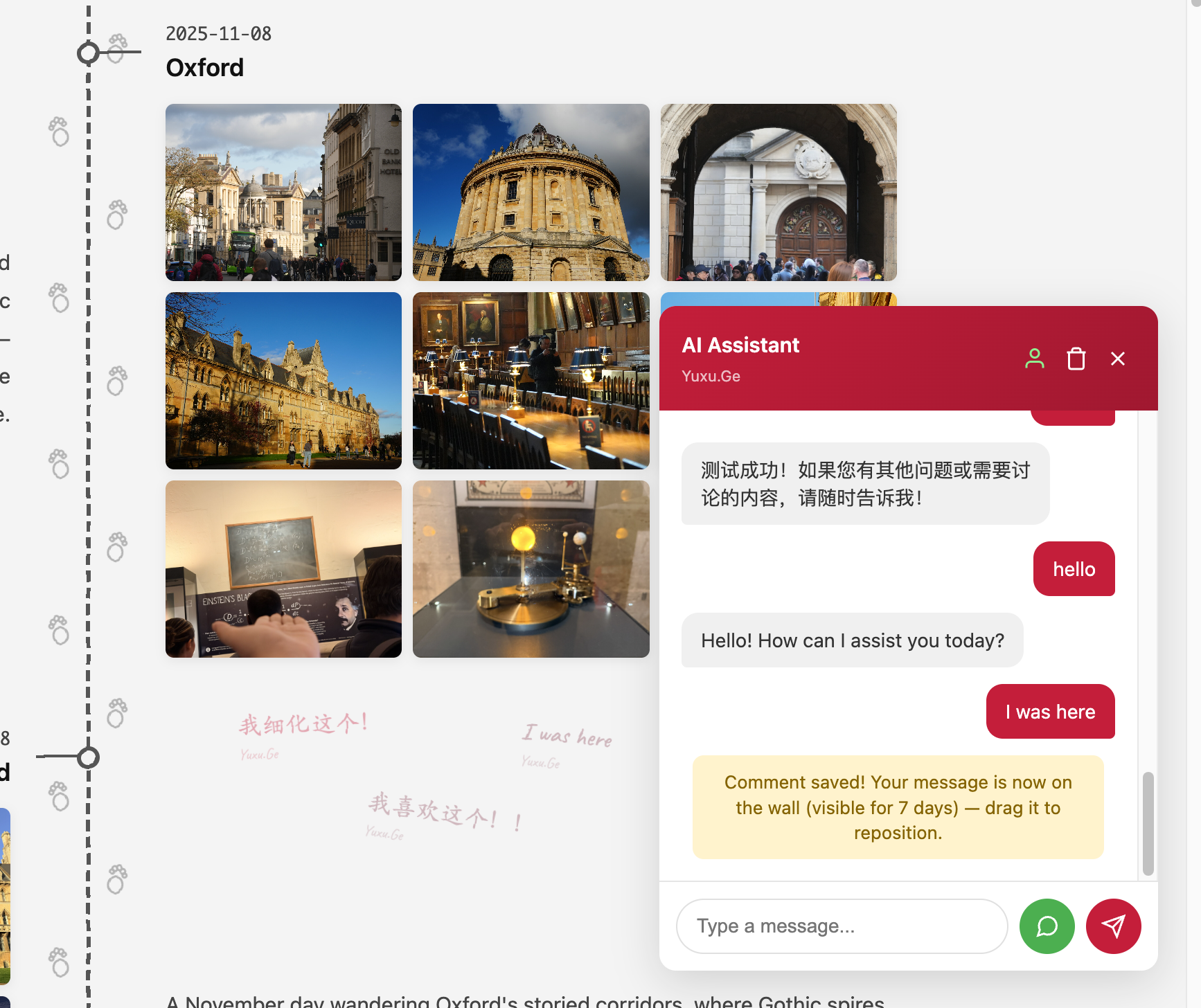
Architecture Design: Balancing Real-time and Persistence
To balance instant feedback with cost-effective persistent storage, I designed a "hybrid storage" architecture consisting of frontend components, backend API (Cloudflare Worker), and data storage layer.
┌─────────────────────────────────────────────────────────────────┐
│                     Frontend (Browser)                           │
├─────────────────────────────────────────────────────────────────┤
│  chat-widget.js    │  graffiti-wall.js    │  comments.js        │
│  (Auth + Submit)   │  (Render + Drag)     │  (Traditional List) │
└─────────────┬───────────────────────┬──────────────────────────┘
              │                       │
              ▼                       ▼
┌──────────────────────────┐  ┌──────────────────────────┐
│ Cloudflare Worker API    │  │   Static JSON Files      │
│  - Cloudflare KV (Live)  │  │ (blog/comments/*.json)   │
│  - Authentication        │  │ - Built at deploy time   │
│  - Comment CRUD          │  │ - Permanently persisted  │
└──────────────────────────┘  └──────────────────────────┘
1. Frontend Component Layer
Handles all user interaction and rendering:
- chat-widget.js: Core interaction entry point. A floating chat bubble that handles email OTP authentication and comment submission.
- graffiti-wall.js: The graffiti wall core. Renders comments as "sticky notes" on the page and enables drag-to-reposition functionality.
- comments.js: Fallback solution. Provides traditional list display when graffiti wall fails to load.
2. Backend API Layer (Cloudflare Worker)
Serverless API deployed on global edge network for low-latency:
- Authentication: Handles OTP code generation, sending via email, and verification
- Comment CRUD: Create and read endpoints, data written to KV in real-time
- Position Updates: Receives new position information when users drag comments
3. Data Storage Layer
The hybrid model is the essence of this architecture:
- Cloudflare KV: A globally distributed key-value store for "hot data" — newly submitted comments not yet persisted. Fast read/write provides instant feedback.
- Static JSON Files: During deployment, CI/CD pulls recent comments from KV and merges them into
comments.jsonfiles. This "cold data" or "persisted data" is distributed with static assets via CDN, loading extremely fast without API requests.
The advantage: new comments appear immediately (from KV), while most historical comments load efficiently through static files (from CDN), achieving optimal balance of performance, real-time capability, and cost.
Core Workflows
1. User Authentication Flow
To lower the barrier for commenting, I opted for email OTP verification instead of complex third-party login:
User enters email → Backend generates 6-digit OTP → Store in KV (5min TTL) → Send email
     ↓
User enters code → Backend verifies OTP → Success → Set HttpOnly Cookie (7 days)
     ↓
First-time users set nickname → Store in user:email record
Session is maintained via a 7-day HttpOnly Cookie, balancing convenience and security.
2. Comment Creation Flow
The core interaction of the graffiti system:
- Submit: User enters content via
chat-widgetand submits - Anchor Detection: Frontend JS detects "anchor elements" near viewport center
- KV Storage: Sends comment content, anchor info, and relative coordinates to Worker API
- Instant Rendering: After API returns success, frontend immediately renders the new comment
// Comment submission data structure
{
  text: "Great photo!",
  pageUrl: "/gallery/",
  anchorId: "album-beijing-2024",      // Anchor element ID
  anchorType: "gallery",                // Anchor type
  anchorOffsetX: 45.5,                  // Relative X offset (0-100%)
  anchorOffsetY: 23.2,                  // Relative Y offset (0-100%)
  rotation: -3.5                        // Rotation angle
}
3. Data Persistence Flow (CI/CD)
To permanently preserve comments, I designed a "solidification" script that runs in CI/CD:
Scheduled task / Manual trigger
     ↓
pull-comments.mjs: Use Wrangler to pull all comment:* keys from KV
     ↓
Save to .cache/comments.json (grouped by pageUrl)
     ↓
merge-comments.mjs: Merge with existing static JSON, deduplicate
     ↓
Generate final blog/comments/*.json files
     ↓
Commit to Git → Trigger deployment
The 7-day KV expiration policy ensures comment data loss only occurs if CI/CD is interrupted for over a week.
4. Comment Loading Flow
For optimal loading performance, frontend requests static JSON and live KV data in parallel:
const [staticComments, liveComments] = await Promise.all([
  fetch('/blog/comments/gallery/.json').then(r => r.json()),
  fetch('/api/comments?page=/gallery/').then(r => r.json())
]);

// Efficient deduplication using Map with id as key
const byId = {};
staticComments.forEach(c => { byId[c.id] = c; });
liveComments.forEach(c => { byId[c.id] = c; });  // New comments override old

// Mark static comments as non-editable
staticComments.forEach(c => { byId[c.id].isOwner = false; });
This strategy ensures:
- Quick display of most (persisted) comments
- Latest comments load in near real-time
- Users still see historical comments even if backend API fails temporarily
Anchor Positioning System: Preventing Comment Drift
If comments were positioned using simple page percentages, they would drift when browser window size changes or page layout adjusts. To solve this, I designed an element anchor positioning system.
Anchor Types
const ANCHOR_CONFIG = {
  anchorSelectors: {
    gallery: '.album-section[id][data-anchor-type="gallery"]',
    food: '.food-card[id][data-anchor-type="food"]',
    blog: '.post-item[id][data-anchor-type="blog"]',
    home: '[id][data-anchor-type="home"]'
  },
  pageAnchorId: 'page'  // Special anchor: entire page
};
Each comment's position is defined by two parts:
- Anchor: The target element ID the comment attaches to
- Relative Offset:
anchorOffsetX: Percentage relative to anchor element width (0-100)anchorOffsetY: Percentage relative to anchor element height (0-100)
Position Calculation
When rendering comments, JS performs this calculation:
calculateAnchorPosition(anchorId, offsetX, offsetY) {
  // Page-level anchor: use percentage directly
  if (anchorId === 'page') {
    return { x: offsetX, y: offsetY, unit: '%' };
  }

  // Element-level anchor: calculate pixel position
  const anchorEl = document.getElementById(anchorId);
  const anchorRect = anchorEl.getBoundingClientRect();
  const wallRect = this.layer.getBoundingClientRect();
  const scrollY = window.scrollY;

  const pixelX = anchorRect.left - wallRect.left + (anchorRect.width * offsetX / 100);
  const pixelY = anchorRect.top + scrollY - wallRect.top + (anchorRect.height * offsetY / 100);

  return { x: pixelX, y: pixelY, unit: 'px' };
}
Anchor Detection During Drag
When dragging comments, frontend calculates distance to all potential anchors in real-time:
findNearestAnchor(clientX, clientY) {
  const anchors = this.getAnchorElements();
  let nearest = null;
  let minDistance = 100; // snapDistance threshold

  for (const anchor of anchors) {
    // Calculate distance to anchor edge
    const distance = this.calculateDistanceToEdge(clientX, clientY, anchor.rect);

    if (distance < minDistance) {
      minDistance = distance;
      // Calculate relative offset within element
      nearest = {
        id: anchor.id,
        type: anchor.type,
        offsetX: ((clientX - anchor.rect.left) / anchor.rect.width) * 100,
        offsetY: ((clientY - anchor.rect.top) / anchor.rect.height) * 100
      };
    }
  }

  // Use page-level anchor when outside all anchor ranges
  if (!nearest) {
    return { id: 'page', type: 'page', offsetX: ..., offsetY: ... };
  }

  return nearest;
}
The nearest anchor is highlighted during drag, helping users position precisely. This system ensures comments stay attached to their intended location even when responsive layouts change.
Implementation Details
OTP Verification
- 6-digit number, stored in KV, valid for 5 minutes
- To prevent brute force, attempt count is tracked; exceeding 5 attempts requires new request
Color System
To make the graffiti wall colorful, I preset 10 soft "colored pencil" hues:
const PENCIL_COLORS = [
  '#C41E3A', // Crimson
  '#2E6B8A', // Steel blue
  '#6B8E23', // Olive drab
  '#B5651D', // Brown ochre
  '#7B4F9E', // Muted purple
  // ...
];

// Deterministically select color based on ID hash
function pickColor(id) {
  let h = 0;
  for (let i = 0; i < id.length; i++) {
    h = ((h << 7) - h + id.charCodeAt(i)) | 0;
  }
  return PENCIL_COLORS[Math.abs(h) % PENCIL_COLORS.length];
}
Rotation Angle
To simulate the casual feel of handwritten sticky notes, each comment is given a random rotation angle between -10 and +10 degrees.
Animation Effects
New comments have a zoom-in pop animation and auto-scroll to position:
@keyframes graffiti-flash {
  0%   { opacity: 0; transform: scale(0.3); filter: blur(4px); }
  15%  { opacity: 1; transform: scale(1.5); filter: blur(0); }
  30%  { transform: scale(1.0); }
  100% { opacity: 0.5; transform: scale(1); }
}
Data Consistency Considerations
The hybrid storage architecture introduces data consistency challenges.
KV Eventual Consistency
Cloudflare KV is eventually consistent. After user A submits a comment, an immediate page refresh might route to an edge node that hasn't synced the data yet, causing the comment to "disappear."
Solution: After successful comment submission, also store the comment in browser's sessionStorage. When loading, prioritize reading from sessionStorage, ensuring users always see their just-submitted content during the current session.
Static JSON Priority
Once a comment is persisted to static JSON, it becomes a read-only authoritative source. Persisted comments cannot be drag-edited, ensuring permanence.
7-Day Expiration Policy
Comments in KV automatically expire after 7 days. This GC (garbage collection) mechanism prevents unpersisted comments from accumulating indefinitely if CI/CD fails for extended periods.
Current Limitations
This system isn't perfect. Current issues include:
Security Issues
- Lacks CSRF protection. Although using HttpOnly Cookie, POST endpoints still carry risk
- No rate limiting on comment submission, risk of bot spam
Data Consistency
- Drag repositioning only updates KV. If comment is persisted before next CI/CD run, position will revert
- If CI/CD is interrupted for over 7 days, comments in KV will be lost due to expiration
Performance Issues
MutationObserverwatches entiredocument.bodyfor DOM changes- Window
resizetriggers full position recalculation for all comments, lacking throttling
Missing Features
- No delete or edit comment functionality
- No report or moderation mechanism
Future Improvement Plan
Addressing the above issues, I've created a phased improvement plan:
P0 (Critical):
- Add rate limiting: Limit comment submission API by IP or user ID
- Implement delete: Allow users to delete their own comments
P1 (Important):
- Use
Promise.allSettledinstead ofPromise.allfor loading comments, improving fault tolerance - Add error monitoring: Integrate Sentry or similar service
P2 (Medium):
- Add throttling to
resizeevent handlers - Narrow
MutationObserverscope frombodyto specific content areas
Conclusion
Building this graffiti comment system has been a fascinating exploration. The hybrid storage architecture cleverly combines Serverless flexibility with static site performance advantages. The element anchor positioning system truly achieves deep integration between comments and content, creating a novel interactive experience.
It's not yet perfect, but the architecture demonstrates good extensibility. Starting from an interesting personal project, it proves we don't need to stick to traditional design patterns — with some creative thinking, we can build more vibrant and personable web products.
I hope this sharing inspires you. Feel free to leave your thoughts on the graffiti wall!